The future begins here.
This page is designed for viewing on a PC
The Lotus Project is currently presented in the form of a 3D design. We are launching a fundraising campaign to produce the first batch of (engineering) prototypes. The second stage involves the production of commercial units for subsequent shipment to our backers. During this second stage, we will provide our backers with full details regarding production timelines and delivery dates. With your support, we know we can succeed. The Lotus Project is a grassroots initiative created for everyday people—those who are tired of seeing the same monotonous phones, year after year. You can choose to become a sponsor or simply offer your support with a small donation. This would be an immense help to us in realizing our dream. Stay tuned—things are about to get interesting! Developer: D. Sattarov.

LOTUS TECHNOLOGIES


Perfection and Individuality

Unleash your dark matter It will be even harder, but it’s worth it Are you ready? Then let’s go!


Introducing two devices from the Lotus line the Lotus Diplomat and the Lotus Tablet (pocket) Below, we'll take a closer look at each. Lotus devices are strikingly different from other devices on the market. These all-new devices with hybrid controls will give users that same feeling of discovery

LOTUS DIPLOMAT
LOOK AT THE WORLD BROADER
AND THE HYBRID DEVICE CONTROL SYSTEM WILL GIVE YOU PRACTICALLY UNLIMITED POSSIBILITIES


A little background

The release of the BlackBerry Passport in 2014 generated significant interest worldwide. Indeed, amidst a multitude of identical and monotonous phones, such a form factor sparked curiosity and offered the promise of a fresh experience for those seeking the optimal device for a variety of tasks. I was one of those people. Among the most critical shortcomings were the square screen, a truncated and extremely awkward keyboard, a lack of operating system support, and a very meager app store. Furthermore, the buggy support for Android applications caused the device to overheat severely and drained the battery rapidly. Using the BlackBerry Passport was a constant battle with compromises. Yet, despite all this, it remained a truly charismatic device. In developing the Lotus Diplomat, I addressed all the shortcomings of the Passport—and, moreover, went even further to enhance convenience for both work and leisure. We will examine all of this in greater detail below.


We will conduct a brief comparison of the Lotus Diplomat and the BlackBerry Passport as similar business-class devices.

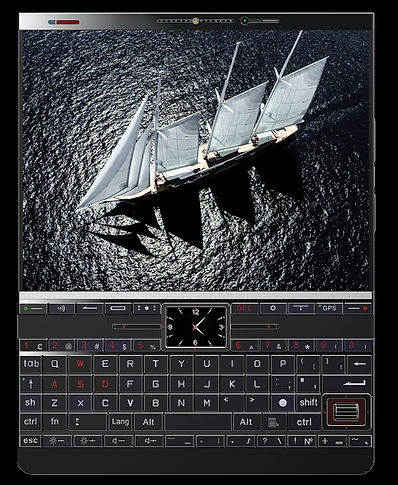


SHORTCOMINGS: 1. - The square screen is unsuitable for watching movies, playing games, and using most applications.
2. - The truncated, inconvenient physical keyboard completely eliminates the possibility fast touch typing. These are the main drawbacks. As for the other problems that's a separate topic.


ADVANTAGES


LOTUS DIPLOMAT
1 – Full-size 4:3 widescreen display
The optimal format for viewing spreadsheets and charts, watching movies, gaming, etc.
2 – Full-size physical keyboard (PC-style)
With a dedicated navigation and system control block
3 – Protective shutter (slider) for the front-facing camera and rear camera module
4 – Small, always-on display (clock)for showing important information... time, notifications, email, calls, weather, etc.
TOP BAR OF THE DEVICE
Front speakers with an LED in the center
IR port for connection to the remote control
Selfie camera with a privacy shutter


MAIN DISPLAY
HEIGHT - 8.3 CM
WIDTH - 10.8 CM
5:4 INCHES OLED and IPS
4:3 2K (2560 X 1920)

I know that not everyone likes OLED screens due to their flickering—and I count myself among those people. I simply cannot read books on OLED displays, especially in the evening. As soon as you begin to lower the screen brightness to make reading comfortable in low-light conditions, the flickering becomes noticeably more aggressive—a direct result of the inherent nature of OLED technology. And this causes physical discomfort. Although OLED is often marketed as a "premium" option thanks to its deep blacks and high contrast (though high, unnatural contrast can itself be a source of discomfort), IPS remains the gold standard for many—precisely because of its stable backlighting (DC dimming) and the more natural reading experience it offers in the dark. IPS screens are more versatile and represent an excellent solution for a wider range of tasks. Therefore, Lotus devices will go on sale with two display options—IPS and OLED—giving users the freedom to choose the device with the screen type that best suits their needs.
For the sake of illustration, I will provide a brief comparison showing how a single photo appears on the Lotus Diplomat display versus on a standard phone


Take a look at how the photo appears on a classic widescreen display. In the 4:3 aspect ratio, you perceive depth and a complete image.
During normal viewing without zooming, your photos will appear too small on the display.

However, the integrity of the image is lost during scaling

Let's see how the website displays on different screens


DISPLAY
4:3 VS 20:9

The display (1.45:1) is very close to the proportions of a standard notebook or book. 3:2 Photo Format: When rounded, this is close to the classic 3:2 format (1.5:1), which is used in full-frame DSLR cameras and laptops.

On this display, you will be able to read books just as you would on an e-reader


The 4:3 aspect ratio makes the screen versatile for both reading books and viewing engineering diagrams and tables.


Add your favorite books to the Lotus Diplomat library and enjoy reading on a comfortable screen
Let’s compare screens in reading mode: the Lotus Diplomat versus a compact e-reader. Comparing it to a standard smartphone makes no sense, as a narrow, elongated screen is completely unsuitable for comfortable reading over extended periods. Let’s also consider the interruptions that arise during the reading process. Here is what I mean: a captivating book literally immerses you in the unfolding events, yet your phone constantly receives SMS messages, emails, chat notifications, order information, phone calls, and much more—all of which pop up right on the main screen. You are forced to swipe away and dismiss these notifications, which severely disrupts your immersion in the text. However, you can redirect all these notifications, calls, and other alerts to the secondary, smaller screen—ensuring that nothing pops up on the main display to distract you. This applies to any application—not just when you are reading a book.

The optimal screen format for viewing tables, diagrams, technical drawings, and any technical information. A convenient tool for students of technical and medical institutes.
The optimal screen format for viewing tables, diagrams, technical drawings, and any technical information. A convenient tool for students of technical and medical institutes.

A convenient display format for working with tables, diagrams, and drawings

The periodic table of elements fit perfectly into the display format

Let's take a look at what the navigation looks like on the Lotus Diplomat's display


GPS


Navigation, route planning and viewing maps on such a screen is very informative


We transform points on a map into future memories, choosing between cozy streets and wild trails

Gaming... this is the area where the Lotus offers virtually the same level of gameplay control as a PC. We will examine this in greater detail below.
MOBILE GAMES PC GAMES


Thanks to its built-in physical keyboard, the Lotus Diplomat offers an incredible gaming experience — one that closely rivals that of a personal computer. In fact, that is precisely what it is... only pocket-sized. This means that boundless possibilities open up before you — opportunities simply unavailable on standard touchscreen devices


I want to play games? but a touchscreen device isn't suitable for that, and sitting in front of a computer for hours isn't an option either. Get a Diplomat, get comfortable on the sofa, and play like you're on a PC

The Lotus Diplomat allows you to game—even while lying on the couch—while maintaining the same level of control comfort you would experience on a full-sized computer. When designing the Lotus, we meticulously considered every detail to make this possible—and this applies not only to gaming but to any other task or workflow as well. Essentially, it is a pocket-sized laptop. It is only slightly larger than a BlackBerry Passport, yet this size is fully justified by its incredible hybrid capabilities.


During gameplay, the screen should remain uncluttered — free of any on-screen touch controls. A cluttered display, overloaded with control icons, transforms the gaming experience from a pleasure into a tedious and cumbersome chore. With the Diplomat, however, you can control the action using a full- featured, customizable physical keyboard, allowing you to stay fully immersed in the moment without the errors often associated with touch- based controls


Controlling gameplay on a touchscreen - is hard work

Here are the main reasons for the discomfort:
Lack of tactile feedback. Unlike a gamepad, where you feel the resistance of the buttons and the movement of the stick, there are no physical landmarks on the glass. Because of this, it's difficult to play "blindly"–you constantly have to check with your eyes whether your finger has hit the virtual button Fingers block the view. Your own hands inevitably cover a significant part of the game space, which is critical in dynamic action games and shooters. Unpredictability of the activation momen Studies show that it is more difficult for the brain to predict the exact moment of touch registration on a sensor. The finger constantly makes micro-movements above the screen, which introduces a delay and reduces accuracy compared to a button, where the finger can rest before pressing.

Right side
+ VOLUME -
CONTROL BUTTON
MULTIFUNCTIONAL
BUTTON
SCREEN + BRIGHTNESS -
BUTTON
Up to four tasks can be assigned to the multifunction button

Left side

speaker
mic
speaker
3.5 mini jack
charging socket
LOWER PARTS OF THE DEVICE
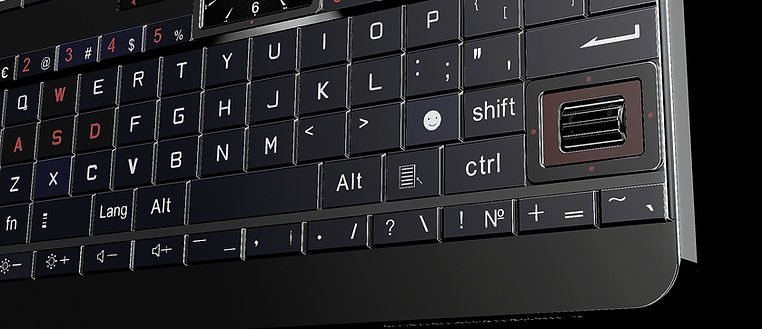
KEYBOARD

The Perfection of Mechanics
Mechanical keyboards are popular not only among professionals who understand why mechanical switches outperform touch-based interfaces; they are also indispensable for individuals suffering from hand tremors or motor impairments—particularly regarding fine motor skills, such as those required for typing on a touchscreen. What is this experience like for people facing such challenges? Touchscreens: When attempting to type a message or tap an icon, they frequently miss their target, brush against adjacent keys, or trigger numerous "double taps" and accidental clicks. Movements: Their condition is often characterized by involuntary, rhythmic oscillations of the hands—movements that typically intensify when the individual attempts to perform a preciseaction (such as picking up a cup or pressing a button). Although this condition is more prevalent among the elderly, it can manifest at any age. Touchscreens demand an exceptionally high degree of fine motor precision and the ability to hold a finger perfectly still at a single point (especially when scrolling). When tremors are present, an individual is unable to steady their finger on the intended key; instead, they accidentally brush against other areas of the screen due to involuntary oscillations and miss their intended target when attempting to position the cursor.
A four-way menu navigation button with an always-on display in the center
ALWAYS ON-DISPLAY

4 - POSITION BUTTON-FRAME FOR MENU NAVIGATION UP - DOWN - RIGHT - LEFT
What's the purpose of the small screen? Let's say you're playing a game on your device and someone calls you. The call appears on the small screen, allowing you to see who's calling without interrupting your gameplay. You have several options: answer or reject the call using the physical buttons, or you can use a universal remote control (I'll explain and show you the remote later). Your main screen remains focused on the app or program you're using and isn't cluttered with notifications. All active notifications will appear on the small screen (the small screen is depicted as a clock with hands). Nothing will distract you from your gameplay at the most important moment. You can customize this and much more in the small screen settings menu
OUTPUT TO THE DESKTOP
SPEAKERPHONE BUTTON
TAB OPENING BUTTON
BACK
TOP PANEL WITH QUICK SETTINGS
SETTING BUTTON
GPS ON/OF
DELETE BUTTON

DESKTOP SCROLL BUTTON - LEFT
DESKTOP SCROLL BUTTON - RIGHT
MAIN KEYBOARD UNIT
A 5-row functional keyboard that doesn't require changing the layout to enter additional characters and symbols. How does it work? For example, the number key "8" has an additional symbol (*). Now, to enter the simply double-tap it and continue typing without interruption. This significantly speeds up work without the distraction of unnecessary manipulations, as with slower older keyboards It's easy and fast. You can also customize the keyboard in the keyboard settings menu.


Let's compare the button sizes on the Lotus Diplomat and the BlackBerry Passport. The Passport features large, comfortable buttons for typing—though the keyboard layout itself is somewhat awkward due to its truncated design—but the individual keys offer a large surface area and are pleasant to press. The Diplomat features equally comfortable buttons with a similarly large surface area.
Let's take a look at the button dimensions:
Passport Diplomat
Button: Button:
Height – 6 mm Height – 7 mm
Width – 8 mm Width – 7 mm
Total number of buttons
on the keyboard
29 70
- + 2 navigation blocks

The navigation unit and scroll wheel in games perform the same functions as a mouse in a PC
MAIN KEYBOARD NAVIGATION BLOCK
SCROLL WHEEL
4-POSITION BUTTON - FRAME
OK

MAIN CAMERA MODULE


The main camera unit is identical on both devices Lotus Diplomat and Lotus Tablet (pocket)
MAIN CAMERA 50MP
ULTA - WIDE
ANGLE CAMERA
24MP
5X OPTICAL ZOOM CAMERA 24MP

FINE METAL MESH FOR INTERNAL HEAT DISSIPATION
LED
LED
REAR CAMERA CURTAIN

UNIVERSAL REMOTE CONTROL


If your phone isn't nearby or in your luggage, no problem—all calls and notifications will be sent to your universal remote control. The remote control is small and convenient; it fits easily in your shirt pocket It's an additional tool for your convenience in various work scenarios.
A Lotus remote control is included in the package. The remote also provides remote control for various home electronics. Equipped with an IR port (on the top of the device), it serves as a universal remote control for Lotus devices. With just a few touches, you can change TV channels, adjust the air conditioner temperature, start a coffee maker, and much more. This feature eliminates the need for multiple bulky remote controls and constantly buying batteries. It also serves as a call answerer (accept - reject). Overall, it's essentially an additional compact smart device, slightly larger than a plastic card. The device's functionality can be significantly expanded with additional programs or apps. We provide the remote control as an optional accessory. Its capabilities are limited only by your imagination. It can also be configured as a joystick in games if the device is mounted on a stand. Customizing the remote control to suit your needs is very simple. It is included with all Lotus devices
Let's move on to reviewing the next device in the Lotus lineup: the Lotus Tablet (Pocket)


LOTUS TABLET (pocket)


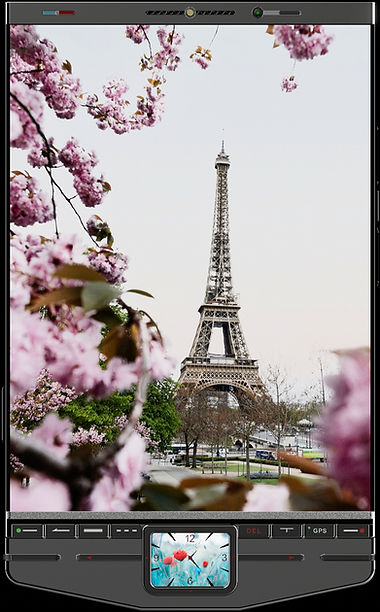
The Lotus Tablet is designed for those who want a large widescreen display and a primary navigation block. For these users, we've retained the central control panel with its primary keys, allowing users to still utilize the hybrid control method. Take a look at this elegant, beautiful, and practical device

IR - PORT FOR CONNECTION WITH THE REMOTE CONTROL
FRONT SPEAKER WITH LED IN THE MIDDLE
FRONT CAMERA WITH PRIVACY SHUTTER


D I S P L A Y
Height: - 13.5cm - (5.11 inches)
Width: - 9.3cm - (3.66 inches) Diagonal: - 16.4cm - (6:45 inches)
Aspect Ratio: 3.4 -
Lotus devices will come with two main display options: IPS and OLED
2K: 1920x2560
ALWAYS ON-DISPLAY

SPEAKERPHONE BUTTON
DESKTOP SCROLL BUTTON - RIGHT
DESKTOP SCROLL BUTTON - LEFT
4 - POSITION BUTTON - FRAME FOR MENU NAVIGATION UP - DOWN - RIGHT - LEFT
SETTING BUTTON


FUNCTIONALITY ELEGANCE BEAUTY


VOICE RECORDER BUTTON
Do you need to record your business conversation? Simply press the button.
If you need to turn of the voice
recorder when the device is locked press and hold the button for the `2 - 3` seconds
When recording is activated the red LED on the button will pulse


BRIEF TECHNICAL CHARACTERISTICS
OF BOTH DEVICES

LOTUS DIPLOMAT
- Main display: 4:3 5.3-inch OLED and IPS 2K (2560x1920) - Always-on display: 1-inch IPS - OS: Android - RAM: 24 GB - Internal storage 1.5TB - Micro SD support: Yes - Camera: 24MP + 50MP + 24MP - FM radio: Yes (built-in antenna) - 3.5 mm jack: Yes - Processor: Snapdragon or Dimensity - Battery: 6100 mAh - Height: 14.8 cm
- Width: 11.3 cm
- Thickness: 8.5 mm
The device will have all the latest protocols at release

LOTUS TABLET (pocket)
- Main display: 4:3 6.3-inch 2K (1920х2560 ) OLED - IPS - Always-on display: 1-inch IPS - OS: Android - RAM: 24 GB - Internal storage: 1.5 TB - Micro SD support: Yes - Camera: 24MP + 50MP +24MP - FM radio: Yes (built-in antenna) - 3.5 mm jack: Yes - Processor Snapdragon or Dimensity - Battery: 6300 mAh - Height: 15.8 cm
- Width: 9.3 cm
- Thickness: 8.5 mm
The device will have all the latest protocols at release
I am currently working on the Lotus Watch; it completes the Lotus product line. Information regarding the clock will be released later. Stay tuned—it’s going to be exciting. The operation of this clock will be incredibly beautiful and mesmerizing, especially in the evening